Product releases: November 2026
Last update

Anna Rasmussen
Product Marketing Manager

Know-your-business (KYB) is live on Thirdfort’s Client Due Diligence (CDD) Platform, our Screening Agent can take the first look at your screening hits, your ID checks now flag known fraud and you can request more Source of funds information in-app. Here’s what’s new in Thirdfort.
Know-your-business moves in
KYB is now ready for every client on the CDD Platform. You can run company checks in the same place you already handle know your client, anti-money laundering and Source of funds. KYB itself has had a major upgrade including:
See who really owns a company with an interactive ownership chart of its ultimate beneficial owners (UBOs).
Run checks on the people and companies you find in your KYB results in a few clicks, all linked back to the original check.
Spot regulated and listed entities at a glance, see address history and go straight to the Companies House record for UK companies.
Get your report back fast. 96% are complete in under a minute.
UK company documents come straight from Companies House, so you know you're getting the latest available information.
Only the reviews that need you
Not every company needs a second look. Until now, every KYB check created a review task, even when there was nothing to review.
You can now choose to create tasks only for KYB checks that come back as “consider”, meaning they have screening results or a risk indicator. Clear checks stay clear, so your Tasks list only holds the reviews that need a human. Your firm can switch this on in your organisation settings.
Off the record? Not any more
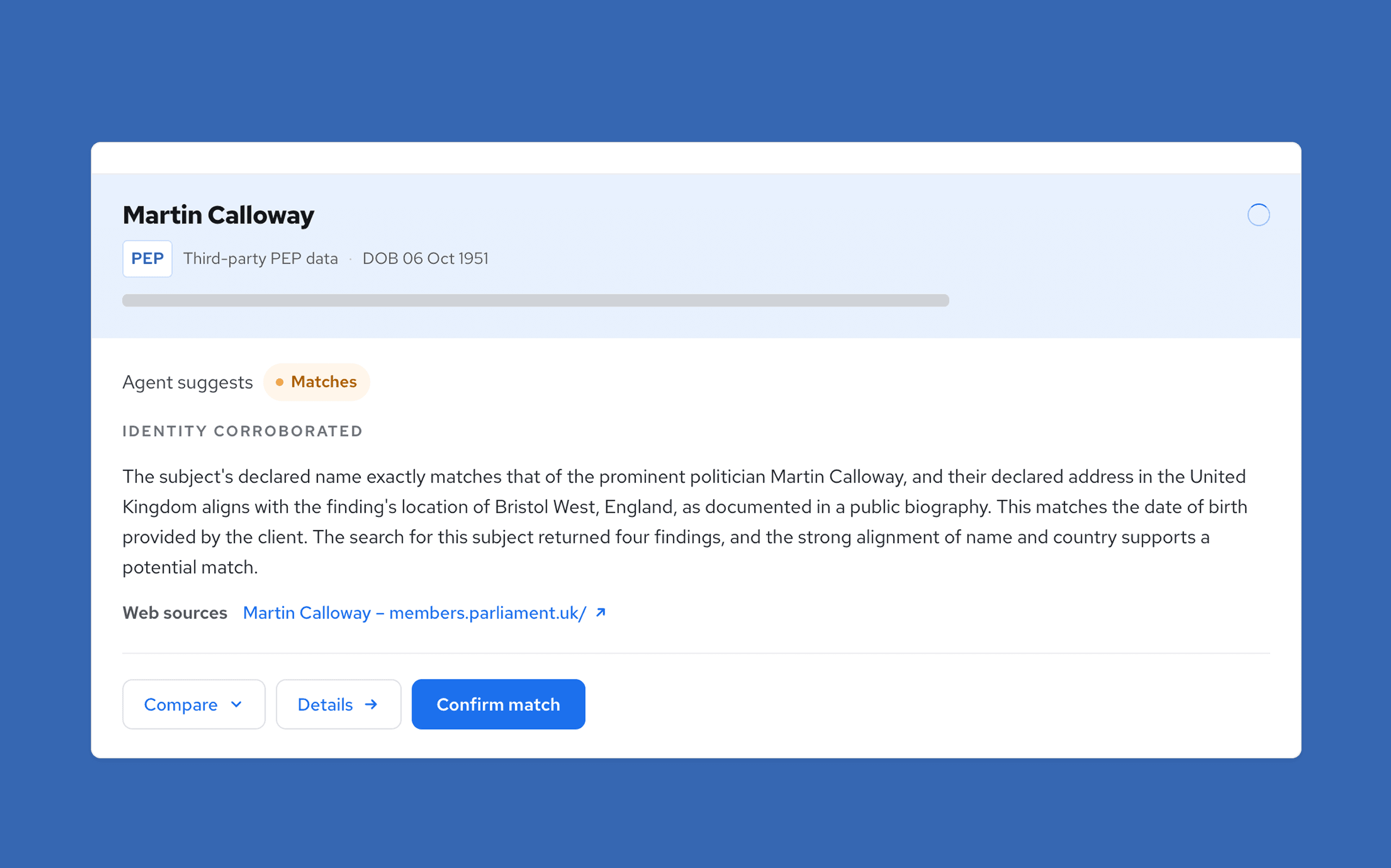
Clearing anti-money laundering (AML) screening hits such as those related to Politically Exposed Persons or sanctions takes time, and six months later the reason a hit was dismissed isn't always clear. Our Screening Agent reviews potential AML screening hits on your clients' checks, researches public sources and records the reasoning behind every recommendation.
You choose how much it decides. Start by reviewing every recommendation, then, when you're ready, let it dismiss the hits it's confident aren't your client and send the rest to your team. Across more than 2,000 hits from live matters, early clients agreed with its recommendations to dismiss in 99.9% of cases.
We're onboarding the first firms personally. Find out how the Screening Agent works.
No more chasing by email
Once your client has completed their Source of funds, you’ll often need to go back to them for something more, like an explanation of a transaction or a missing document. Until now, that back and forth happened over email, outside Thirdfort and away from your audit trail.
Now you can ask from within the CDD Platform. Choose Request info on a completed Source of funds verification and write what you need. We’ll let your client know. They’ll answer each question in the Thirdfort app, including typing a reply and uploading a document where required.
We’ll email you when your client responds.
Their answers appear in the Requests tab, and any documents land in Evidence.
Both are included in the PDF report, so the request and the response sit on file with the rest of the check.
Find out how to request more information.
Fraud and risk indicators upgrade
We already flag Right to Rent tenants whose identity is linked to previously identified fraud. From 20th November, we’ll do the same on Original ID and Enhanced NFC ID checks.
There's nothing to switch on. Every Original ID and Enhanced NFC ID check on the CDD Platform includes it automatically, so you get an extra layer of protection without changing how you work. Any match appears in the fraud and risk indicators section of your report. Find out how to read it.
No chip, no problem
We've rebuilt the Enhanced NFC ID journey around the moments your clients most often got stuck. Every new Enhanced NFC ID check now uses it.
If your client starts scanning their passport and finds it doesn't have a chip, they can now go back and complete Original ID instead.
Tablets and phones that can't read a chip skip straight to Original ID, so nobody is asked to do something their device can't.
Skip a task yourself
Sometimes a client can't complete a task, such as proof of ownership when they're selling as an executor. Until now, you had to ask our Support team to skip it. Now you can do it yourself, straight from the check.
Every task you can skip has a Skip button in the check's progress bar. Before you confirm, you'll see what your report will lose and give a reason. Skips are final, and we record who skipped the task and why in the activity log, so your audit trail stays complete.
You can skip:
Source of funds.
Bank statements.
Proof of address (the result moves to Consider).
Proof of ownership.
The NFC chip scan (the check uses Original ID instead).
The ID verification step, personal details and address verification can't be skipped. Find out more about skipping tasks.
Download your checks list as a CSV
Need a list of every check with ongoing monitoring for one fee earner? Filter All checks, then choose Download as CSV from the actions menu next to the search box. A new Initiated by filter lets you narrow the list to the checks one person started.
The file includes every check that matches, not just the ones on screen. You'll get each client's name and reference, status, ongoing monitoring, date initiated, products, who initiated it, team and a link back to the check. You can download up to 10,000 checks at a time.
Gift declarations on your report
Lenders need a giftor's declaration on file. Now giftor checks with Source of funds show the giftor's status on the summary page of the PDF report, along with the four declarations they made:
The gift doesn't need repaying.
It's to help buy the property.
They expect no legal or beneficial interest in the property.
They won't be living there.
You'll find it on both the Source of funds and identity verification reports for any report generated from the 5th of November 2026.
Full bank details for linked accounts
When your client connects their bank through Open Banking or uploads bank statements, you can now see the full account number and sort code in the CDD Platform and on the PDF report, making it easier to match the account to the details you already hold.
A few smaller improvements
We also:
Keep the organisation and team you pick in the CDD Platform selected as you move between pages.
Let you update your firm's billing contact yourself, from the Billing tab.
Improved the layout of PDF reports.
That's everything new on Thirdfort this month. Most of it started as a conversation with one of you, so if something is still getting in your way, we'd love to hear about it.
Want to see a demo?
Our team are ready to guide you through the implementation of a more intelligent approach to client due diligence.
Subscribe to our newsletter
Subscribe to our monthly newsletter for recaps and recordings of our webinars, invitations for upcoming events and curated industry news. We’ll also send our guide to Digital ID Verification as a welcome gift.
Our Privacy Policy sets out how the personal data collected from you will be processed by us.